
On-page SEO audit
SEO audit tool for a site you track
We read the site's pages and give you a score out of 100 and the issues sorted by impact: missing titles, 4xx pages, thin content, redirects.
Baca dalam Bahasa IndonesiaSample report for a demo site. Your results appear on your own site.
- A score for every site
- Issues sorted by what they cost
- 100 pages per site on Free
- Up to 5,000 pages per site on Scale
- The URLs behind each issue on Starter
- Next actions ranked by impact and effort
From score to fix
Know what to fix first
The audit lives on the same site as your rankings, so a fix and the position it moved end up next to each other.
The real screen
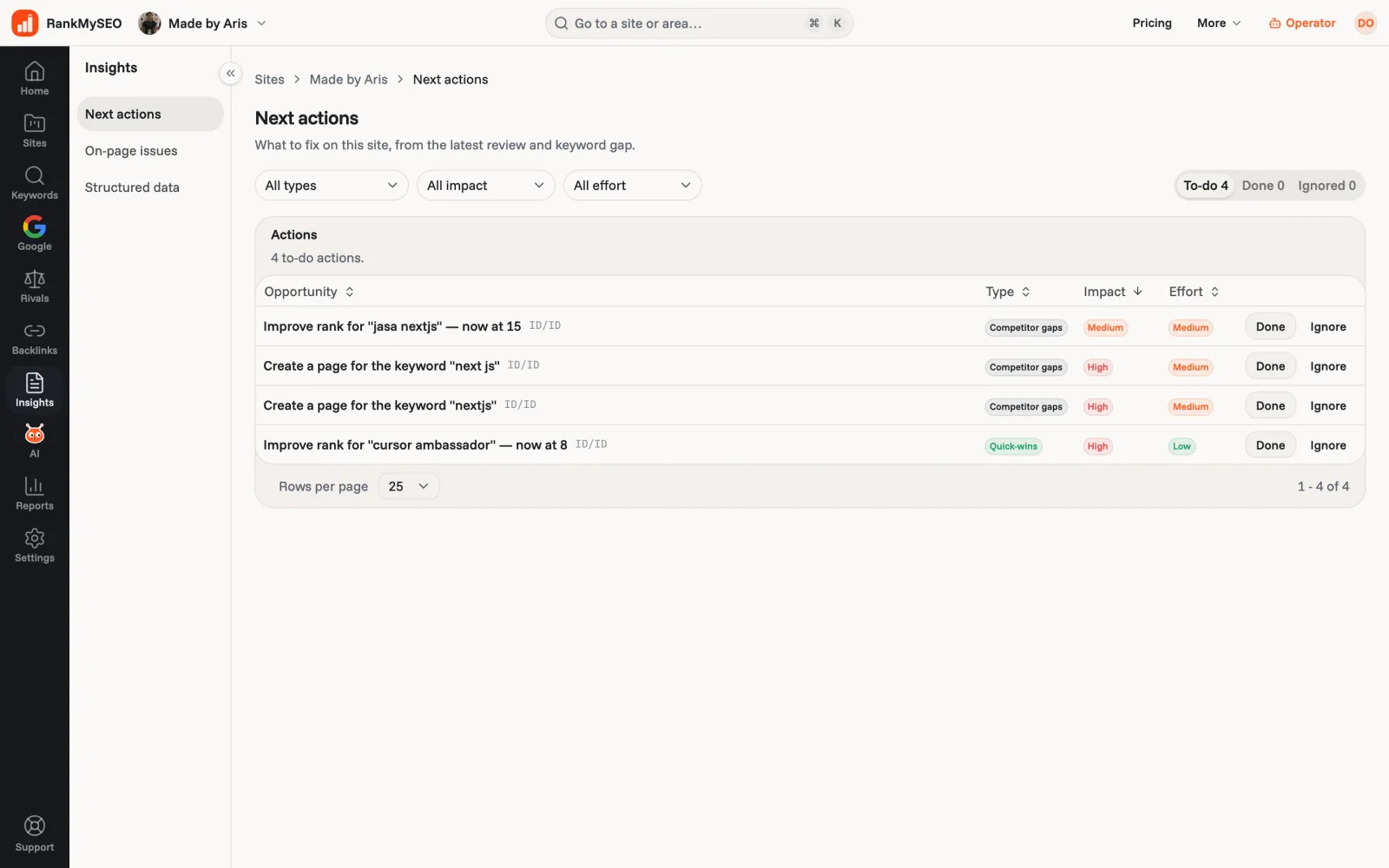
Next actions turns the review into a to-do list
Each row names the fix, its likely impact, and how much work it is. Mark it done or ignore it and the list keeps up.
What it reads
The HTML a search engine gets first
We fetch each page and read the HTML it sends, the way a crawler does on its first pass. That covers titles, meta descriptions, the H1, broken links, 4xx pages, redirects, thin content, pages blocked from indexing, HTTPS, and the sitemap.
- We do not run JavaScript. If a page only fills in after scripts run, the audit sees the empty version, and so may a search engine.
- It only reads the site you added. It does not wander the open web or pull Search Console.
- Pages per site: 100 on Free, 250 on Starter, 1,000 on Growth, 2,000 on Agency, 5,000 on Scale.
Start
Your first audit
- 1
Add the site
On Starter and above the review runs in the background. You can close the tab. - 2
Read the score
Open Insights, then On-page issues. The worst problems sit at the top. - 3
Fix and check again
Work through the list, then watch the rank chart for the keywords those pages target.
Keep going
Pair the audit with
- On-page SEO checklistWhat each issue means and how to fix it by hand.Explore
- Keyword rank trackerSee whether a fix moved the keyword the page targets.Explore
- StarterCompetitor trackingFind the gaps a rival covers that you could fix with one page.Explore
- StarterBacklink reviewLinks count too. See who links to you and who stopped.Explore
Questions people ask
- Is the audit free?
- Yes. Free shows the score and how many pages have each issue on 100 pages of one site. The list of URLs behind an issue starts at Starter, because listing them costs another pass over the site.
- Do I have to start it?
- No. On Starter and above the review starts in the background when you open the site, and it reads deeper when your plan allows more pages.
- Does it check Core Web Vitals?
- No. It flags slow load times it sees while reading the HTML, but it does not measure Core Web Vitals. Use Google PageSpeed Insights on the pages it flags.
- Can I check structured data?
- Yes. Paste code on any plan. Checking a live page by URL starts at Starter.
See what is hurting your site
Starter reads 250 pages per site and opens the URLs behind every issue, for $5 / Rp50rb a month.