
Backlink checker
Check backlinks on a site you track
See which websites link to yours, which links you won or lost lately, and which sites link to a rival but not to you. Then build the disavow file for the ones you want Google to ignore. Starter and above.
Baca dalam Bahasa Indonesia- Referring domains, not raw link counts
- New and lost links over 30, 60, or 90 days
- A year of history on Growth and above
- Opportunities from your saved rivals
- A disavow file ready for Search Console
- 50 to 600 rows per list, by plan
Three tabs on Backlinks
Who links to you, who could, and who should not
The review runs in the background the first time and stays on the site, so you can come back to it without waiting again.
The real screen
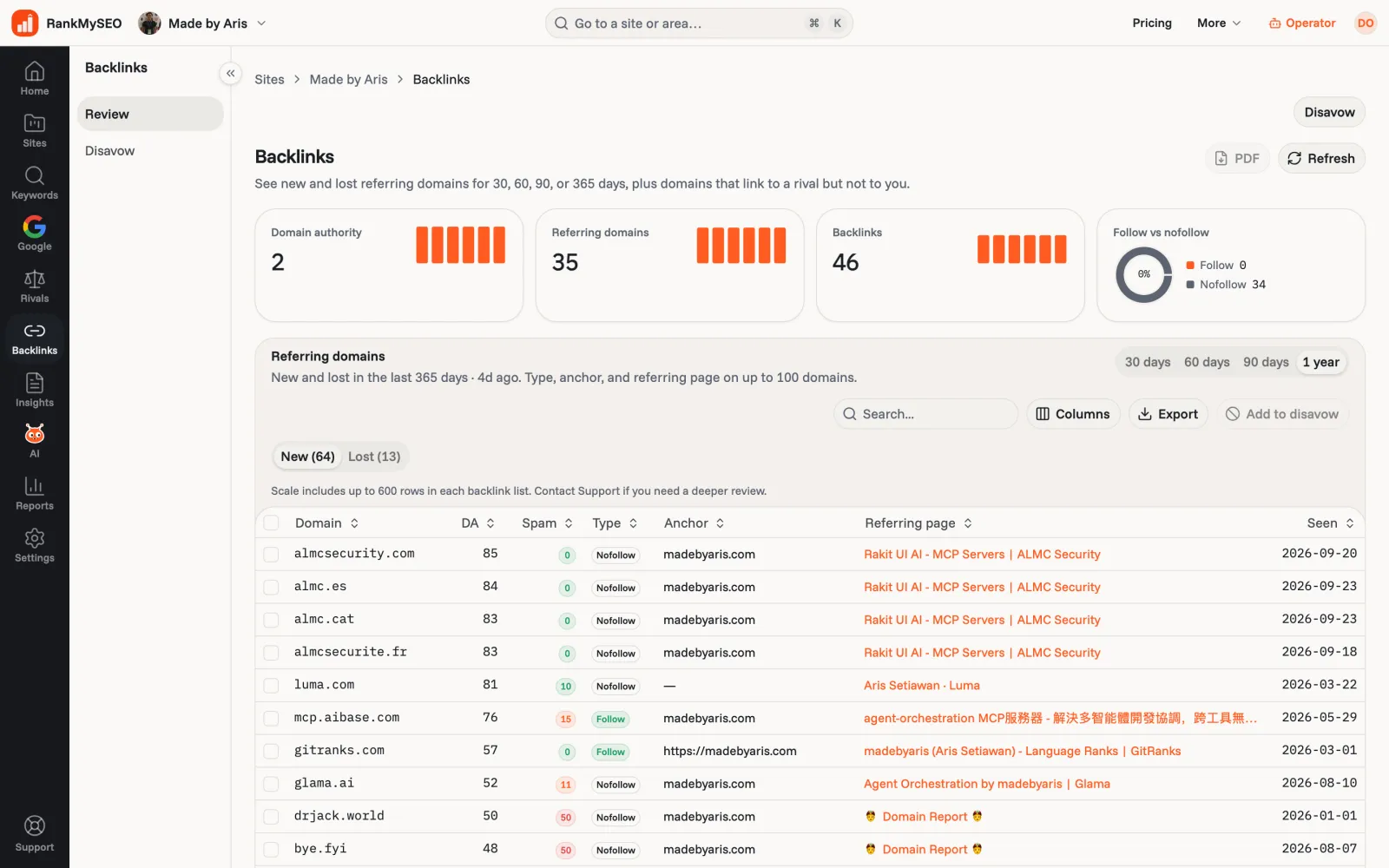
Referring domains, new and lost, in one table
Authority, spam score, follow or nofollow, anchor, and the page that links to you. Tick a row to send it to the disavow list.
Why domains
We count sites, not links
A backlink is a link from someone else's site to yours, and Google reads it as a sign your page deserves to rank. Fifty links from one blog say less than one link each from fifty sites, so the review counts referring domains.
Disavow
Tell Google which links to ignore
Some links hurt more than they help, usually spam you never asked for. Download the disavow file and upload it in Search Console. Downloading does not start a new check.
- One domain per line, written as domain:example.com, with a comment line at the top.
- The list stays in the dashboard. An AI assistant can read your backlinks but cannot disavow them.
- Most sites never need one. Disavow when you see spam you did not build, or after a manual action.
Start
Your first backlink review
- 1
Add the site
Use the site you already track, or add a new one. Save a rival too if you want Opportunities. - 2
Open Backlinks
The first review runs in the background. When it lands, Review shows the domains and what changed. - 3
Act on it
Ask the Opportunities for a link, and add the spam to Disavow. Your rank chart shows whether it moved anything.
Keep going
Links are one part of it
- Free backlink snapshotCheck estimated backlink and referring-domain totals for a public domain.Explore
- How to disavow backlinksThe file format, when it helps, and when it does nothing.Explore
- StarterCompetitor trackingSave the rivals whose links you want to see.Explore
- Keyword rank trackerWatch the keywords a new link should move.Explore
- On-page auditFix the page before you send links to it.Explore
Questions people ask
- How many rows does each list show?
- Up to 50 per list on Starter, 150 on Growth, 300 on Agency, and 600 on Scale. That applies to new, lost, and opportunity lists.
- How far back does it look?
- 30, 60, or 90 days on Starter. Growth, Agency, and Scale add a one-year view.
- Is backlink review on Free?
- No. Free keeps rank tracking. The backlink review starts at Starter.
- Can an AI assistant read it?
- Yes. A Starter key can call
backlink_reviewover MCP. Disavow stays in the dashboard, because sending that list to Google is a call you make yourself. See AI assistants.
See who links to your site
Backlink review and the disavow list start on Starter at $5 / Rp50rb a month.